Twitter Profile
Retrieve structured public Twitter/X profile data and recent tweets from a profile URL.
To enable the Twitter Profile API, set engine=twitter_profile on every request.
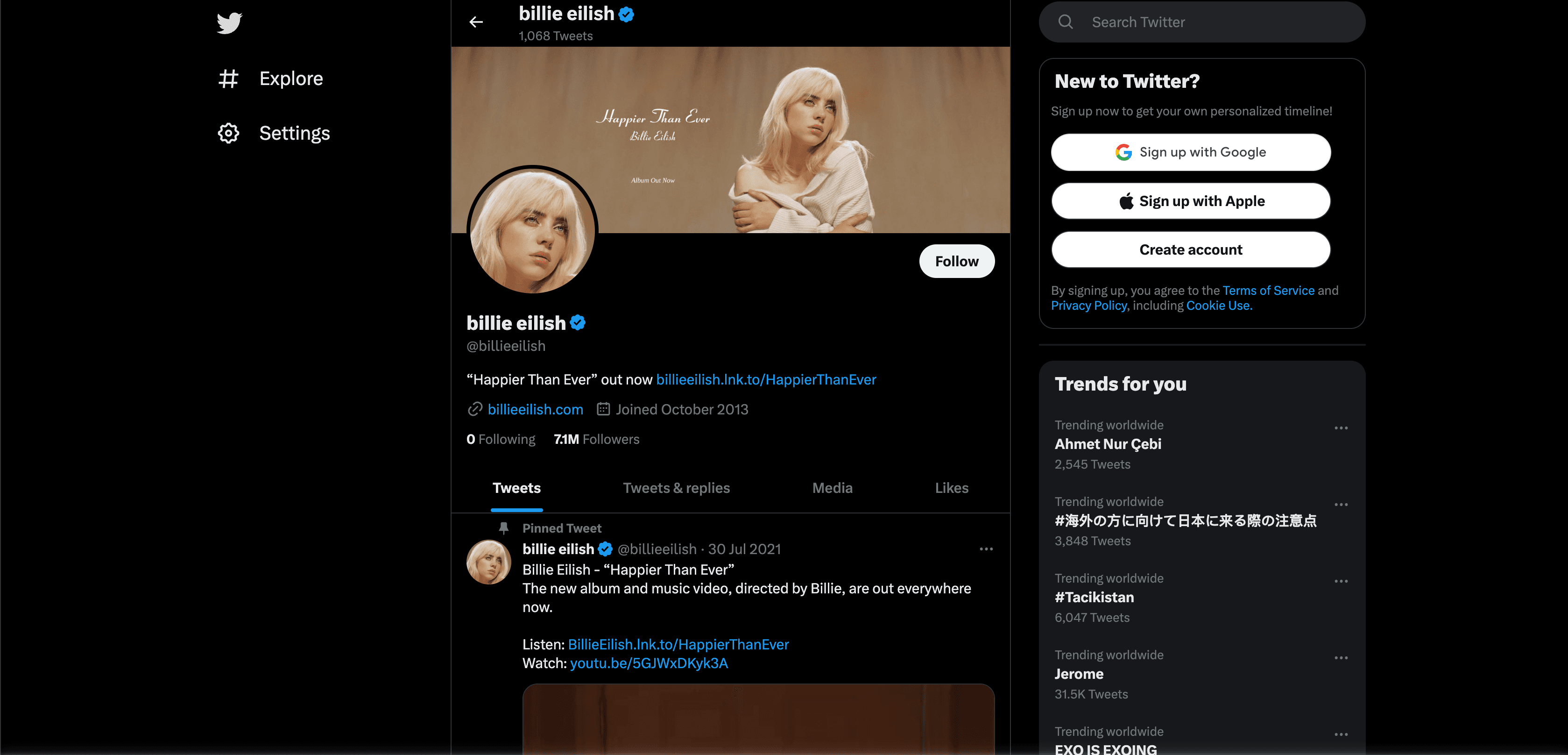
Use Twitter Profile to retrieve public profile information from a Twitter/X profile URL. The response can include profile metadata, follower counts, bio information, account links, pinned content, and a configurable number of recent tweets when available.
Request
curl --get "https://social.webscrapingapi.com/v1" \
  --data-urlencode "api_key=<YOUR_API_KEY>" \
  --data-urlencode "engine=twitter_profile" \
  --data-urlencode "url=https://twitter.com/billieeilish" \
  --data-urlencode "number_of_tweets=40"
const API_KEY = "<YOUR_API_KEY>";
const API_URL = "https://social.webscrapingapi.com/v1";
const params = new URLSearchParams({
api_key: API_KEY,
engine: "twitter_profile",
url: "https://twitter.com/billieeilish",
number_of_tweets: "40",
});
const response = await fetch(`${API_URL}?${params}`);
const data = await response.json();
console.log(data);import requests
api_key = "<YOUR_API_KEY>"
response = requests.get(
"https://social.webscrapingapi.com/v1",
params={
"api_key": api_key,
"engine": "twitter_profile",
"url": "https://twitter.com/billieeilish",
"number_of_tweets": 40,
},
)
print(response.json())<?php
$apiKey = '<YOUR_API_KEY>';
$query = http_build_query([
'api_key' => $apiKey,
'engine' => 'twitter_profile',
'url' => 'https://twitter.com/billieeilish',
'number_of_tweets' => 40,
]);
$response = file_get_contents("https://social.webscrapingapi.com/v1?$query");
echo $response;package main
import (
"fmt"
"io"
"net/http"
"net/url"
)
func main() {
params := url.Values{}
params.Add("api_key", "<YOUR_API_KEY>")
params.Add("engine", "twitter_profile")
params.Add("url", "https://twitter.com/billieeilish")
params.Add("number_of_tweets", "40")
requestURL := "https://social.webscrapingapi.com/v1?" + params.Encode()
response, err := http.Get(requestURL)
if err != nil {
panic(err)
}
defer response.Body.Close()
body, err := io.ReadAll(response.Body)
if err != nil {
panic(err)
}
fmt.Println(string(body))
}import java.io.IOException;
import java.net.URI;
import java.net.URLEncoder;
import java.net.http.HttpClient;
import java.net.http.HttpRequest;
import java.net.http.HttpResponse;
import java.nio.charset.StandardCharsets;
public class Main {
public static void main(String[] args) throws IOException, InterruptedException {
String apiKey = "<YOUR_API_KEY>";
String requestUrl = "https://social.webscrapingapi.com/v1"
+ "?api_key=" + URLEncoder.encode(apiKey, StandardCharsets.UTF_8)
+ "&engine=twitter_profile"
+ "&url=" + URLEncoder.encode("https://twitter.com/billieeilish", StandardCharsets.UTF_8)
+ "&number_of_tweets=40";
HttpRequest request = HttpRequest.newBuilder()
.uri(URI.create(requestUrl))
.GET()
.build();
HttpResponse<String> response = HttpClient.newHttpClient().send(
request,
HttpResponse.BodyHandlers.ofString()
);
System.out.println(response.body());
}
}using System;
using System.Net.Http;
using System.Threading.Tasks;
class Program
{
static async Task Main()
{
var apiKey = "<YOUR_API_KEY>";
var profileUrl = "https://twitter.com/billieeilish";
var requestUrl = $"https://social.webscrapingapi.com/v1?api_key={Uri.EscapeDataString(apiKey)}&engine=twitter_profile&url={Uri.EscapeDataString(profileUrl)}&number_of_tweets=40";
using var client = new HttpClient();
var response = await client.GetStringAsync(requestUrl);
Console.WriteLine(response);
}
}require "net/http"
require "uri"
uri = URI("https://social.webscrapingapi.com/v1")
uri.query = URI.encode_www_form(
api_key: "<YOUR_API_KEY>",
engine: "twitter_profile",
url: "https://twitter.com/billieeilish",
number_of_tweets: 40
)
response = Net::HTTP.get(uri)
puts responseRequest parameters
| Parameter | Type | Required | Description |
|---|---|---|---|
api_key | string | ✅ | Your WebScrapingAPI key. |
engine | string | ✅ | Use twitter_profile. |
url | string | ✅ | Public Twitter/X profile URL. |
number_of_tweets | number | ❌ | Number of tweets to return from the profile. Defaults to 0. |
Response
Response fields
| Field | Type | Description |
|---|---|---|
search_parameters | object | Request details, selected engine, profile URL, and tweet limit. |
profile | object | Profile metadata such as name, username, bio, location, website, avatar, banner, and account statistics. |
profile.name | string | Display name. |
profile.username | string | Profile handle. |
profile.description | string | Profile bio. |
profile.followers_count | number | Follower count when available. |
profile.following_count | number | Following count when available. |
profile.verified | boolean | Verification state when returned. |
tweets | array | Recent tweets when number_of_tweets is greater than 0 and tweets are available. |
tweets[].id | string | Tweet identifier. |
tweets[].text | string | Tweet text. |
tweets[].created_at | string | Tweet timestamp when available. |
tweets[].metrics | object | Reply, repost, like, and view counts when available. |
Response example
{
  "search_parameters": {
    "engine": "twitter_profile",
    "url": "https://twitter.com/billieeilish",
    "number_of_tweets": 40
  },
  "profile": {
    "name": "billie eilish",
    "username": "billieeilish",
    "description": "Public profile description",
    "followers_count": 7400000,
    "following_count": 0,
    "verified": true,
    "avatar": "https://pbs.twimg.com/profile_images/example.jpg",
    "banner": "https://pbs.twimg.com/profile_banners/example.jpg"
  },
  "tweets": [
    {
      "id": "1234567890",
      "text": "Example public tweet text",
      "created_at": "2026-01-01T12:00:00.000Z",
      "metrics": {
        "replies": 120,
        "reposts": 240,
        "likes": 1200,
        "views": 50000
      }
    }
  ]
}
Twitter/X can change which public profile modules are visible by account state, region, login requirements, and rate limits. Treat tweet lists, profile media, metrics, and verification metadata as optional.
Keep API keys server-side and do not expose them in browser-side code.