Best Buy Async API
Scrape Best Buy product data asynchronously and retrieve structured product records.
To enable this engine, set the engine=bestbuy_async parameter.
Scraping Best Buy product pages can be challenging due to anti-scraping measures. With the Best Buy Async API, you send a POST request to the endpoint and the async engine handles the extraction workflow. The initial response returns a snapshot_id, which you can use to retrieve the finished records with the Snapshot API.
Scrape Best Buy Products
Best Buy Async API Integration Examples
We will use the following URL for the POST request:
https://ecom.webscrapingapi.com/v1?engine=bestbuy_async&api_key=<YOUR_API_KEY>&type=productWe will use this body for the POST request:
[
  {
    "url": "https://www.bestbuy.com/site/singsation-freestyle-wireless-karaoke-system-blue/6523913.p?skuId=6523913"
  },
  {
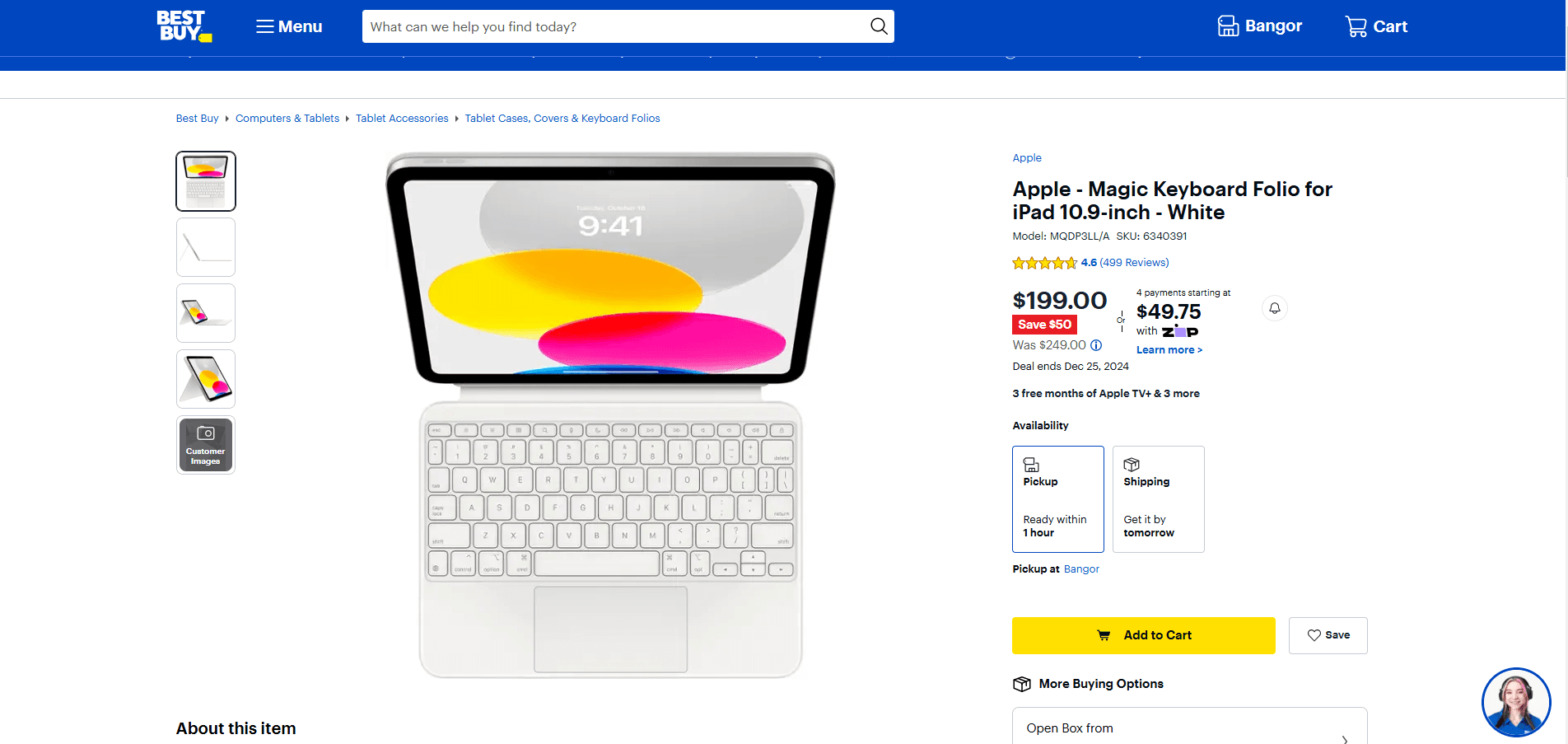
    "url": "https://www.bestbuy.com/site/apple-magic-keyboard-folio-for-ipad-10-9-inch-white/6340391.p?skuId=6340391"
  }
]
Request parameters
| Parameter | Required | Type | Description |
|---|---|---|---|
api_key | ✅ | string | Your API key. |
engine | ✅ | string | Must be bestbuy_async. |
type | ✅ | string | Must be product. |
discover_by | ❌ | string | Discovery mode for the input body. Use keywords when submitting keyword-based discovery inputs. |
The request body is a JSON array of input objects. Each object should include a Best Buy product url unless you are using a discovery mode.
Ready to Use Best Buy Product Scraping Scripts
curl --request POST "https://ecom.webscrapingapi.com/v1?api_key=<YOUR_API_KEY>&engine=bestbuy_async&type=product" \
  --header "Content-Type: application/json" \
  --data '[
    {
      "url": "https://www.bestbuy.com/site/singsation-freestyle-wireless-karaoke-system-blue/6523913.p?skuId=6523913"
    },
    {
      "url": "https://www.bestbuy.com/site/apple-magic-keyboard-folio-for-ipad-10-9-inch-white/6340391.p?skuId=6340391"
    }
  ]'
const API_KEY = "<YOUR_API_KEY>";
const SCRAPER_URL = "https://ecom.webscrapingapi.com/v1";
const params = new URLSearchParams({
api_key: API_KEY,
engine: "bestbuy_async",
type: "product",
});
const response = await fetch(`${SCRAPER_URL}?${params}`, {
method: "POST",
headers: { "Content-Type": "application/json" },
body: JSON.stringify([
{
url: "https://www.bestbuy.com/site/singsation-freestyle-wireless-karaoke-system-blue/6523913.p?skuId=6523913",
},
{
url: "https://www.bestbuy.com/site/apple-magic-keyboard-folio-for-ipad-10-9-inch-white/6340391.p?skuId=6340391",
},
]),
});
const data = await response.json();
console.log(data.snapshot_id);import requests
API_KEY = "<YOUR_API_KEY>"
SCRAPER_URL = "https://ecom.webscrapingapi.com/v1"
PARAMS = {
"api_key": API_KEY,
"engine": "bestbuy_async",
"type": "product",
}
PAYLOAD = [
{
"url": "https://www.bestbuy.com/site/singsation-freestyle-wireless-karaoke-system-blue/6523913.p?skuId=6523913"
},
{
"url": "https://www.bestbuy.com/site/apple-magic-keyboard-folio-for-ipad-10-9-inch-white/6340391.p?skuId=6340391"
},
]
response = requests.post(SCRAPER_URL, params=PARAMS, json=PAYLOAD)
response.raise_for_status()
print(response.json()["snapshot_id"])<?php
$apiKey = '<YOUR_API_KEY>';
$scraperUrl = 'https://ecom.webscrapingapi.com/v1';
$query = http_build_query([
'api_key' => $apiKey,
'engine' => 'bestbuy_async',
'type' => 'product',
]);
$payload = json_encode([
[
'url' => 'https://www.bestbuy.com/site/singsation-freestyle-wireless-karaoke-system-blue/6523913.p?skuId=6523913',
],
[
'url' => 'https://www.bestbuy.com/site/apple-magic-keyboard-folio-for-ipad-10-9-inch-white/6340391.p?skuId=6340391',
],
]);
$context = stream_context_create([
'http' => [
'method' => 'POST',
'header' => "Content-Type: application/json\r\n",
'content' => $payload,
],
]);
$response = file_get_contents("{$scraperUrl}?{$query}", false, $context);
echo $response;package main
import (
"bytes"
"fmt"
"io"
"net/http"
)
func main() {
url := "https://ecom.webscrapingapi.com/v1?api_key=<YOUR_API_KEY>&engine=bestbuy_async&type=product"
payload := []byte(`[
{"url":"https://www.bestbuy.com/site/singsation-freestyle-wireless-karaoke-system-blue/6523913.p?skuId=6523913"},
{"url":"https://www.bestbuy.com/site/apple-magic-keyboard-folio-for-ipad-10-9-inch-white/6340391.p?skuId=6340391"}
]`)
req, _ := http.NewRequest("POST", url, bytes.NewReader(payload))
req.Header.Add("Content-Type", "application/json")
res, _ := http.DefaultClient.Do(req)
defer res.Body.Close()
body, _ := io.ReadAll(res.Body)
fmt.Println(string(body))
}import java.net.URI;
import java.net.http.HttpClient;
import java.net.http.HttpRequest;
import java.net.http.HttpResponse;
public class Main {
public static void main(String[] args) throws Exception {
String payload = """
[
{"url":"https://www.bestbuy.com/site/singsation-freestyle-wireless-karaoke-system-blue/6523913.p?skuId=6523913"},
{"url":"https://www.bestbuy.com/site/apple-magic-keyboard-folio-for-ipad-10-9-inch-white/6340391.p?skuId=6340391"}
]
""";
HttpRequest request = HttpRequest.newBuilder()
.uri(URI.create("https://ecom.webscrapingapi.com/v1?api_key=<YOUR_API_KEY>&engine=bestbuy_async&type=product"))
.header("Content-Type", "application/json")
.POST(HttpRequest.BodyPublishers.ofString(payload))
.build();
HttpResponse<String> response = HttpClient.newHttpClient().send(
request,
HttpResponse.BodyHandlers.ofString()
);
System.out.println(response.body());
}
}using System;
using System.Net.Http;
using System.Text;
using System.Threading.Tasks;
class Program
{
static async Task Main()
{
var url = "https://ecom.webscrapingapi.com/v1?api_key=<YOUR_API_KEY>&engine=bestbuy_async&type=product";
var payload = """
[
{"url":"https://www.bestbuy.com/site/singsation-freestyle-wireless-karaoke-system-blue/6523913.p?skuId=6523913"},
{"url":"https://www.bestbuy.com/site/apple-magic-keyboard-folio-for-ipad-10-9-inch-white/6340391.p?skuId=6340391"}
]
""";
using var client = new HttpClient();
var content = new StringContent(payload, Encoding.UTF8, "application/json");
var response = await client.PostAsync(url, content);
var body = await response.Content.ReadAsStringAsync();
Console.WriteLine(body);
}
}require "json"
require "net/http"
require "uri"
uri = URI("https://ecom.webscrapingapi.com/v1?api_key=<YOUR_API_KEY>&engine=bestbuy_async&type=product")
request = Net::HTTP::Post.new(uri)
request["Content-Type"] = "application/json"
request.body = [
{
url: "https://www.bestbuy.com/site/singsation-freestyle-wireless-karaoke-system-blue/6523913.p?skuId=6523913",
},
{
url: "https://www.bestbuy.com/site/apple-magic-keyboard-folio-for-ipad-10-9-inch-white/6340391.p?skuId=6340391",
},
].to_json
response = Net::HTTP.start(uri.hostname, uri.port, use_ssl: true) do |http|
http.request(request)
end
puts response.bodyOnce you send the POST request with the required parameters, the API will process your request and return a snapshot_id, which can be used to fetch the results via the Snapshot API.
Response example
{
  "snapshot_id": "s_m516exisyz3atta8g"
}
Retrieving Results Using the Snapshot API
Once you've submitted a POST request to the Best Buy Async API and received a snapshot_id, you can use the Snapshot API to retrieve the processed results. This lets you fetch data asynchronously once it's ready.
We will use the following URL as an example of getting results from a snapshot_id:
https://ecom.webscrapingapi.com/v1?api_key=<YOUR_API_KEY>&snapshot_id=s_m516exisyz3atta8gWhen the data is ready, the API will return a JSON response containing the scraped results.
Result response example
{
  "0": {
    "input": {
      "url": "https://www.bestbuy.com/site/apple-magic-keyboard-folio-for-ipad-10-9-inch-white/6340391.p?skuId=6340391"
    },
    "url": "https://www.bestbuy.com/site/apple-magic-keyboard-folio-for-ipad-10-9-inch-white/6340391.p?skuId=6340391",
    "product_id": "6340391",
    "title": "Apple - Magic Keyboard Folio for iPad 10.9-inch - White",
    "images": [
      "https://pisces.bbystatic.com/image2/BestBuy_US/images/products/6340/6340391_sd.jpg"
    ],
    "final_price": "$199.00",
    "currency": "USD",
    "discount": "Save $50",
    "initial_price": "$249.00",
    "root_category": "Computers & Tablets",
    "rating": 4.6,
    "reviews_count": 499,
    "questions_count": 34,
    "product_description": "Shop Apple Magic Keyboard Folio for iPad 10.9-inch White at Best Buy.",
    "features": [
      "Comfortable typing experience with a scissor mechanism with 1 mm travel."
    ]
  }
}