Twitter Tweets
Scrape a public Twitter/X post by URL and return tweet details as JSON.
To enable the Twitter Tweets API, set engine=twitter_tweets on every request.
Scraping Twitter tweets is a powerful technique for gathering meaningful insights about trending topics, user opinions, and sentiments. With the Twitter Tweets API, you can extract data from a public tweet URL and return details such as the post text, publish time, engagement counts, and status.
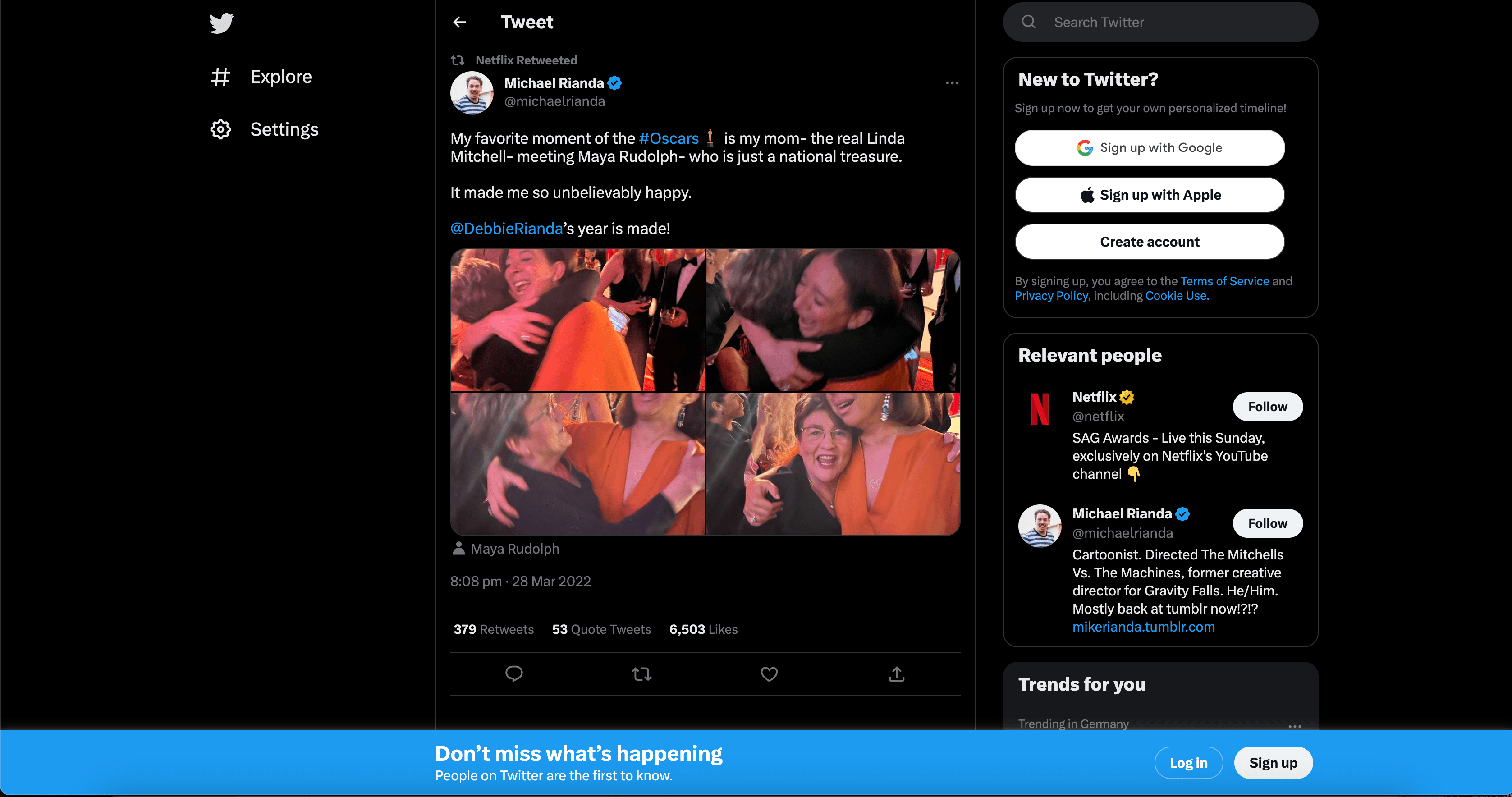
Scrape Tweets
Request
Use the code samples below to send a Twitter Tweets API request:
curl --get "https://social.webscrapingapi.com/v1" \
  --data-urlencode "api_key=<YOUR_API_KEY>" \
  --data-urlencode "engine=twitter_tweets" \
  --data-urlencode "url=https://twitter.com/netflix/status/1508551897287782400"
const API_KEY = "<YOUR_API_KEY>";
const API_URL = "https://social.webscrapingapi.com/v1";
const params = new URLSearchParams({
api_key: API_KEY,
engine: "twitter_tweets",
url: "https://twitter.com/netflix/status/1508551897287782400",
});
const response = await fetch(`${API_URL}?${params}`);
const data = await response.json();
console.log(data);import requests
api_key = "<YOUR_API_KEY>"
response = requests.get(
"https://social.webscrapingapi.com/v1",
params={
"api_key": api_key,
"engine": "twitter_tweets",
"url": "https://twitter.com/netflix/status/1508551897287782400",
},
)
print(response.json())<?php
$apiKey = '<YOUR_API_KEY>';
$query = http_build_query([
'api_key' => $apiKey,
'engine' => 'twitter_tweets',
'url' => 'https://twitter.com/netflix/status/1508551897287782400',
]);
$response = file_get_contents("https://social.webscrapingapi.com/v1?$query");
echo $response;package main
import (
"fmt"
"io"
"net/http"
"net/url"
)
func main() {
params := url.Values{}
params.Add("api_key", "<YOUR_API_KEY>")
params.Add("engine", "twitter_tweets")
params.Add("url", "https://twitter.com/netflix/status/1508551897287782400")
requestURL := "https://social.webscrapingapi.com/v1?" + params.Encode()
response, err := http.Get(requestURL)
if err != nil {
panic(err)
}
defer response.Body.Close()
body, err := io.ReadAll(response.Body)
if err != nil {
panic(err)
}
fmt.Println(string(body))
}import java.io.IOException;
import java.net.URI;
import java.net.URLEncoder;
import java.net.http.HttpClient;
import java.net.http.HttpRequest;
import java.net.http.HttpResponse;
import java.nio.charset.StandardCharsets;
public class Main {
public static void main(String[] args) throws IOException, InterruptedException {
String apiKey = "<YOUR_API_KEY>";
String requestUrl = "https://social.webscrapingapi.com/v1"
+ "?api_key=" + URLEncoder.encode(apiKey, StandardCharsets.UTF_8)
+ "&engine=twitter_tweets"
+ "&url=" + URLEncoder.encode("https://twitter.com/netflix/status/1508551897287782400", StandardCharsets.UTF_8);
HttpRequest request = HttpRequest.newBuilder()
.uri(URI.create(requestUrl))
.GET()
.build();
HttpResponse<String> response = HttpClient.newHttpClient().send(
request,
HttpResponse.BodyHandlers.ofString()
);
System.out.println(response.body());
}
}using System;
using System.Net.Http;
using System.Threading.Tasks;
class Program
{
static async Task Main()
{
var apiKey = "<YOUR_API_KEY>";
var tweetUrl = "https://twitter.com/netflix/status/1508551897287782400";
var requestUrl = $"https://social.webscrapingapi.com/v1?api_key={Uri.EscapeDataString(apiKey)}&engine=twitter_tweets&url={Uri.EscapeDataString(tweetUrl)}";
using var client = new HttpClient();
var response = await client.GetStringAsync(requestUrl);
Console.WriteLine(response);
}
}require "net/http"
require "uri"
uri = URI("https://social.webscrapingapi.com/v1")
uri.query = URI.encode_www_form(
api_key: "<YOUR_API_KEY>",
engine: "twitter_tweets",
url: "https://twitter.com/netflix/status/1508551897287782400"
)
response = Net::HTTP.get(uri)
puts responseRequest parameters
| Parameter | Type | Required | Description |
|---|---|---|---|
api_key | string | ✅ | Your WebScrapingAPI key. |
engine | string | ✅ | Use twitter_tweets. |
url | string | ✅ | Public Twitter/X tweet URL. |
Response
The response contains the requested post and related metadata. Exact fields can vary by post type and Twitter/X availability.
Response fields
| Field | Type | Description |
|---|---|---|
search_parameters | object | Request details, selected engine, Twitter/X domain, and tweet URL. |
search_information | object | Metadata about result availability and matching state. |
post_id | string | Tweet identifier. |
post_url | string | Canonical tweet URL. |
post_text | string | Text content of the tweet. |
post_time | string | Tweet publish timestamp when available. |
post_retweets | number | Retweet count when available. |
post_comments | number | Comment or reply count when available. |
post_likes | number | Like count when available. |
status | string | Response status returned by the API. |
Response example
{
  "search_parameters": {
    "twitter_url": "https://twitter.com/netflix/status/1508551897287782400",
    "engine": "twitter",
    "twitter_domain": "twitter.com",
    "device": "desktop",
    "url": "https://twitter.com/netflix/status/1508551897287782400"
  },
  "search_information": {
    "organic_results_state": "Results for exact spelling",
    "total_results": null,
    "query_displayed": null
  },
  "post_id": "1508551897287782400",
  "post_url": "https://twitter.com/netflix/status/1508551897287782400",
  "post_text": "My favorite moment of the #Oscars is my mom- the real Linda Mitchell- meeting Maya Rudolph- who is just a national treasure. It made me so unbelievably happy. @DebbieRianda's year is made!",
  "post_time": "2022-03-28T17:08:51.000Z",
  "post_retweets": 379,
  "post_comments": 53,
  "post_likes": 6503,
  "status": "Ok"
}
Only public tweet URLs can be scraped. Protected, deleted, age-gated, or unavailable posts may return partial data or an error.
Keep API keys server-side and do not expose them in browser-side code.