Walmart Product
Scrape Walmart products in real time with the Walmart API.
To enable this feature, set the type=product parameter.
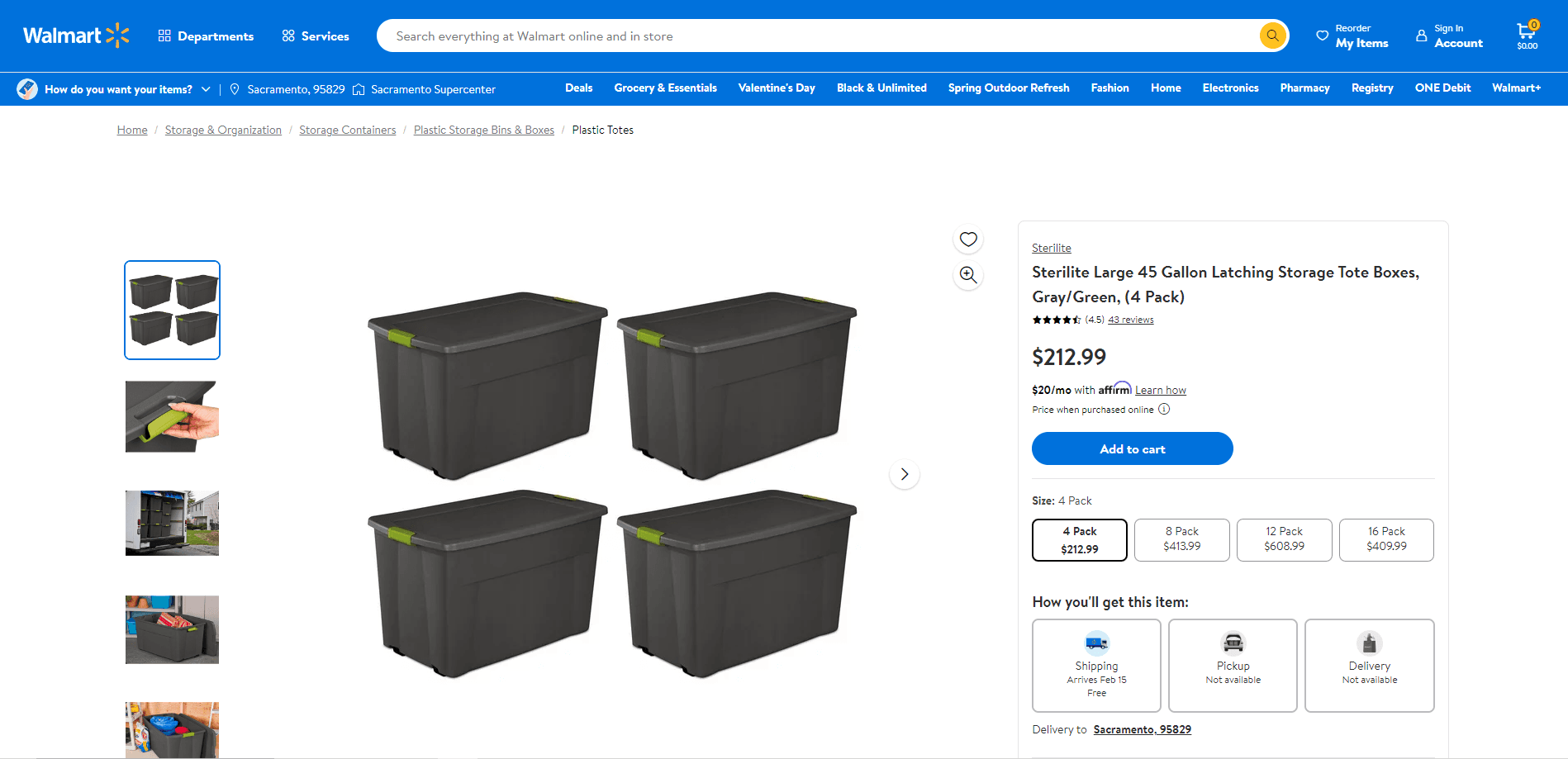
The Walmart Product feature returns a JSON object containing data related to the scraped Walmart product. Among others, you will get an overview of:
brandcategoriesdescription_fulldescription_shortimagesphysical_propertiespickup_extraspriceratingrelated_products_also_viewedreviews_summaryshipping_extrasspecification
Walmart Product Parameters
The Walmart Product feature only takes one specific parameter:
| Parameter | Required | Type | Description |
|---|---|---|---|
product_id | ✅ | string | The ID of the Walmart product you want to scrape. |
Your full GET request should then be sent to the following address:
https://ecom.webscrapingapi.com/v1?api_key=<YOUR_API_KEY>&engine=walmart&type=product&product_id=<PRODUCT_ID>How to get Walmart Product ID
Walmart identifies products by their ID. Our API uses the same identifier to scrape a Walmart product.
To get the ID of a Walmart product, first navigate to its page. The ID of a product can be extracted straight from the URL. The structure of a Walmart product URL is:
https://<WALMART_DOMAIN>/ip/<PRODUCT_NAME>/<PRODUCT_ID>Walmart Product Integration Examples
curl --get "https://ecom.webscrapingapi.com/v1" \
  --data-urlencode "api_key=<YOUR_API_KEY>" \
  --data-urlencode "engine=walmart" \
  --data-urlencode "type=product" \
  --data-urlencode "product_id=10401056"
const API_KEY = "<YOUR_API_KEY>";
const SCRAPER_URL = "https://ecom.webscrapingapi.com/v1";
const params = new URLSearchParams({
api_key: API_KEY,
engine: "walmart",
type: "product",
product_id: "10401056",
});
const response = await fetch(`${SCRAPER_URL}?${params}`);
const data = await response.text();
console.log(data);import requests
API_KEY = "<YOUR_API_KEY>"
SCRAPER_URL = "https://ecom.webscrapingapi.com/v1"
PARAMS = {
"api_key": API_KEY,
"engine": "walmart",
"type": "product",
"product_id": "10401056",
}
response = requests.get(SCRAPER_URL, params=PARAMS)
print(response.text)<?php
$apiKey = '<YOUR_API_KEY>';
$scraperUrl = 'https://ecom.webscrapingapi.com/v1';
$query = http_build_query([
'api_key' => $apiKey,
'engine' => 'walmart',
'type' => 'product',
'product_id' => '10401056',
]);
$response = file_get_contents("{$scraperUrl}?{$query}");
echo $response;package main
import (
"fmt"
"io"
"net/http"
"net/url"
)
func main() {
apiKey := "<YOUR_API_KEY>"
baseURL := "https://ecom.webscrapingapi.com/v1"
params := url.Values{}
params.Add("api_key", apiKey)
params.Add("engine", "walmart")
params.Add("type", "product")
params.Add("product_id", "10401056")
req, _ := http.NewRequest("GET", baseURL+"?"+params.Encode(), nil)
res, _ := http.DefaultClient.Do(req)
defer res.Body.Close()
body, _ := io.ReadAll(res.Body)
fmt.Println(string(body))
}import java.net.URI;
import java.net.http.HttpClient;
import java.net.http.HttpRequest;
import java.net.http.HttpResponse;
import java.net.URLEncoder;
import java.nio.charset.StandardCharsets;
public class Main {
public static void main(String[] args) throws Exception {
String apiKey = "<YOUR_API_KEY>";
String url = "https://ecom.webscrapingapi.com/v1"
+ "?api_key=" + URLEncoder.encode(apiKey, StandardCharsets.UTF_8)
+ "&engine=walmart"
+ "&type=product"
+ "&product_id=10401056";
HttpRequest request = HttpRequest.newBuilder()
.uri(URI.create(url))
.GET()
.build();
HttpResponse<String> response = HttpClient.newHttpClient().send(
request,
HttpResponse.BodyHandlers.ofString()
);
System.out.println(response.body());
}
}using System;
using System.Net;
using System.Net.Http;
using System.Threading.Tasks;
class Program
{
static async Task Main()
{
var apiKey = "<YOUR_API_KEY>";
var url = "https://ecom.webscrapingapi.com/v1"
+ "?api_key=" + WebUtility.UrlEncode(apiKey)
+ "&engine=walmart"
+ "&type=product"
+ "&product_id=10401056";
using var client = new HttpClient();
var response = await client.GetAsync(url);
var body = await response.Content.ReadAsStringAsync();
Console.WriteLine(body);
}
}require "net/http"
require "uri"
api_key = "<YOUR_API_KEY>"
uri = URI("https://ecom.webscrapingapi.com/v1")
uri.query = URI.encode_www_form({
api_key: api_key,
engine: "walmart",
type: "product",
product_id: "10401056",
})
response = Net::HTTP.get_response(uri)
puts response.bodyResponse example
{
  "search_parameters": {
    "walmart_url": "https://www.walmart.com/ip/Sterilite-Large-45-Gallon-Latching-Storage-Tote-Boxes-Gray-Green-4-Pack/10401056",
    "engine": "walmart",
    "device": "desktop",
    "type": "product",
    "product_id": "10401056",
    "scroll_to_bottom": true
  },
  "product_results": {
    "brand": "Sterilite",
    "name": "Sterilite Large 45 Gallon Latching Storage Tote Boxes, Gray/Green, (4 Pack)",
    "description_short": "(4) 45-gallon storage totes provide a convenient storage solution around your home.",
    "image_primary": "https://i5.walmartimages.com/seo/example.jpeg",
    "images": [
      "https://i5.walmartimages.com/seo/example.jpeg"
    ],
    "price": 212.99,
    "price_currency": "USD",
    "rating": 4.4884,
    "rating_count": 43,
    "pickup_available": false,
    "shipping_extras": {
      "type": "SHIPPING",
      "availabilityStatus": "AVAILABLE"
    },
    "product_identifiers": {
      "usItemId": "10401056",
      "upc": "073149948106",
      "model": "4 x 19483V04"
    },
    "categories": [
      {
        "level": 1,
        "name": "Home",
        "link": "https://www.walmart.com/cp/home/4044"
      }
    ]
  }
}
Scraping Walmart Product Page